
AI living room design lets you upload a photo of your current room and preview new layouts, colours, furniture styles and decor ideas before you spend money on paint, sofas or trades. It is most useful when you use it as a planning tool: keep the room’s real dimensions in mind, compare several design directions, then turn the best preview into a practical shopping and renovation brief.
For UK homeowners and renters, this is a low-risk way to test whether a darker wall colour, built-in media unit, larger rug or different style will actually work. The result is not a final technical drawing, but it can make early design decisions faster.
Key takeaways
- AI living room design works best when you upload a bright, straight-on photo of the real room.
- Use it to compare styles, colour palettes, furniture placement and renovation ideas before buying anything.
- The most believable results come from clear prompts that mention your room type, UK home context and practical constraints.
- AI previews are visual planning aids, not a substitute for measurements, building regulations or professional trade advice.
- If you are ready to experiment, you can try the AI studio and generate a living room redesign from your own photo.
What is AI living room design?
AI living room design is an online way to restyle a room from an uploaded image. Instead of starting with a blank mood board, you begin with your own living room photo, then ask the tool to preview a different interior style, colour scheme, layout or finish.
This makes it different from general interior inspiration. Pinterest boards and showroom photos rarely show your exact proportions, ceiling height, windows, radiator positions, alcoves or awkward corners. AI gives you a more relevant starting point because it is reacting to the room you already have.
Before and after: what an AI redesign can show
A strong before/after preview should make the proposed change easy to understand. You should be able to compare the room’s existing structure with a fresh style direction, while still recognising the original space.
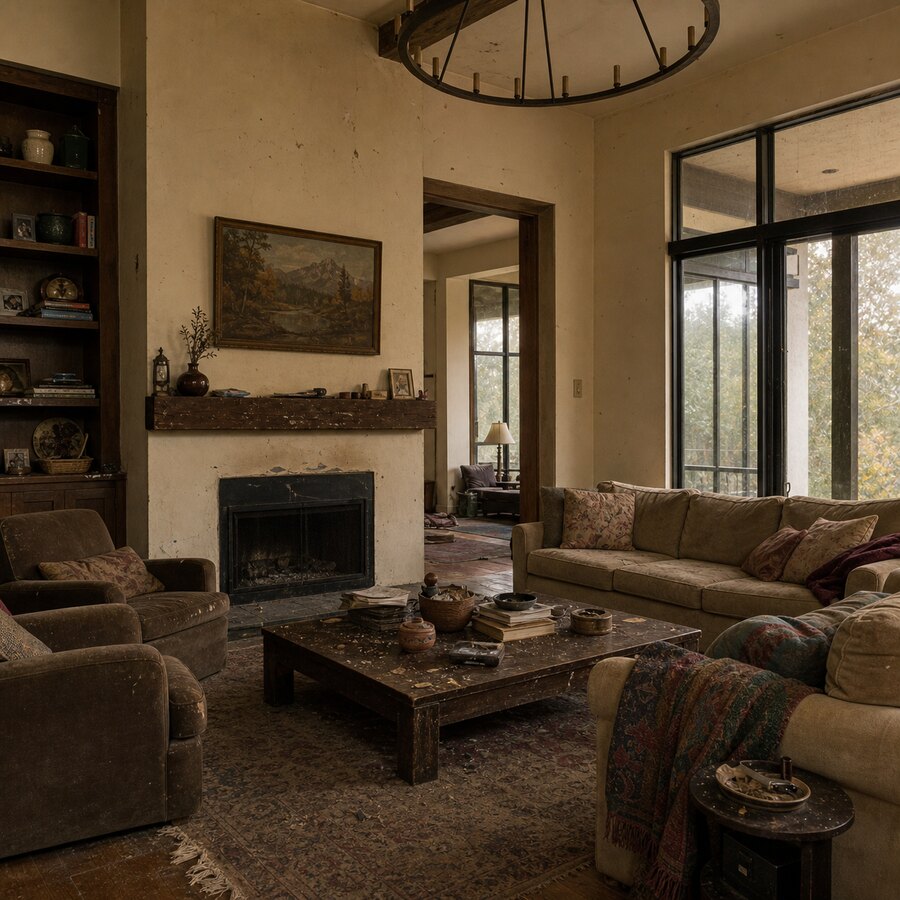
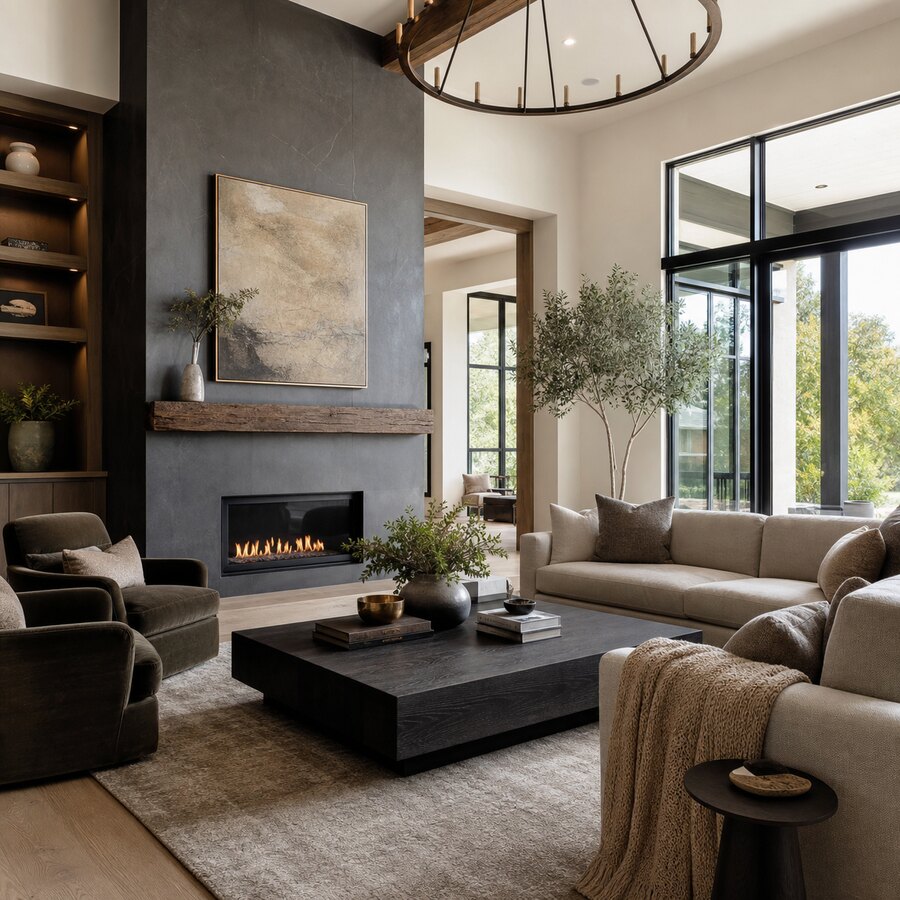
You can see more examples on our before and after room redesigns page, including how different rooms respond to colour, texture and layout changes.
When should you use AI for a living room redesign?
AI is especially useful when you know the room needs improvement but you are unsure what direction to take. It can help you narrow choices before hiring a decorator, ordering samples or visiting furniture shops.
Use it before choosing a style
Many people like several styles at once: Japandi, modern rustic, Scandinavian, traditional, contemporary or soft minimal. A style can look excellent in a large studio photo and awkward in a compact UK lounge. AI lets you test those looks against your own room first.
If you are considering a warmer, calmer direction, our guide to Japandi ideas for small UK homes is useful too. The same principles of natural texture, calm contrast and reduced clutter often translate well into living rooms.
Use it before buying big-ticket items
A sofa, media unit, flooring change or built-in storage can easily cost hundreds or thousands of pounds. A visual preview helps you ask better questions before buying: does the room need a corner sofa, a larger rug, closed storage or a lighter TV wall?
Use it before decorating
Paint is cheaper than structural work, but the wrong colour can still waste time and money. AI previews are good for testing warm neutrals, olive greens, muted blues, plaster pinks, charcoal accents or off-white walls. Always check physical samples in your room before buying paint, because UK light changes dramatically through the day.
How to get a better AI living room design result
The quality of the output depends heavily on the input. A clear photo and specific brief will usually give you a much more useful preview.
1. Start with a clear photo
Take the photo in daylight if possible. Stand in a corner or doorway so the image captures as much of the room as possible. Keep the camera level, avoid extreme wide-angle distortion and include the walls, floor, windows, main furniture, fireplace, alcoves and obvious constraints.
2. Give the AI practical context
Instead of asking for “a nice living room”, describe what you actually want. Mention the property type, lifestyle and design direction:
- “Redesign this small Victorian terrace living room in a warm modern style, keeping the fireplace and making space feel brighter.”
- “Create a family-friendly AI living room design with closed toy storage, a washable rug and a calm neutral palette.”
- “Preview a modern rustic lounge with a media wall, oak tones, soft lighting and a budget-conscious UK high street feel.”
For a design you can actually recreate, mention the budget level too: “under £1,500”, “mid-range” or “premium but not luxury”.
3. Generate several versions
One preview is rarely enough. Try a few variations using the same photo: light Scandinavian, richer traditional, modern rustic, family-friendly or renter-friendly. If several previews all suggest a larger rug, softer lighting and less visual clutter around the TV, that is a useful signal.
Which living room styles work well with AI previews?
Most mainstream interior styles work well, but styles with clear materials, colour palettes and furniture shapes tend to produce the most practical previews.
Modern warm neutral
This works in small rooms, period properties and new builds: off-white walls, beige or taupe textiles, wood tones, black accents and layered lighting.
Japandi and Scandinavian
These suit calmer living rooms with less clutter: pale woods, low furniture, linen textures, simple shapes and soft contrast.
Modern rustic
Modern rustic previews are useful if you like character but do not want the room to feel old-fashioned. Ask for natural materials, warm lighting, timber details and a balanced mix of old and new.
Contemporary media-wall style
If your living room revolves around the TV, AI can help you compare floating units, built-in cupboards, shelves and concealed lighting before speaking to a joiner or electrician. Fire safety, ventilation, wiring and wall structure still need proper checks.
What AI cannot decide for you
A good preview can make a room feel more tangible, but it cannot measure your space, confirm electrical safety or price a renovation accurately. Before spending money, check ceiling heights, door swings, radiator positions, socket locations and walking routes. If the redesign implies building work, fitted joinery, electrical changes or fireplace alterations, speak to a qualified professional.
Turning an AI preview into a real shopping plan
Once you have a preview you like, break it down into decisions: wall colour, floor tone, rug size, sofa shape, curtains, lighting, storage and artwork. Then decide what can be reused and what would need to change.
Then group the work by budget: low-spend cosmetic changes, mid-range furniture and lighting, and higher-spend flooring, fitted joinery or trade-led work. This keeps the image grounded in sensible choices for your home and budget.
Ready to preview your own living room?
If you have a photo of your current space, you can try the AI studio and create an AI living room design in a few minutes. Upload the room, choose a style direction and compare ideas before you commit to purchases or renovation work.
For more inspiration, see our small UK living room before-and-after test and our broader guide to AI room makeover ideas that feel real.
FAQ
Is AI living room design accurate?
It can be visually useful, but it is not perfectly accurate. AI can preview colours, styles and broad layouts from your photo, but you still need real measurements and practical checks before buying furniture or starting work.
Can I use AI living room design for a small UK lounge?
Yes. It can be especially helpful for small lounges because you can test lighter palettes, better storage, different sofa shapes and less cluttered layouts before spending money. Use prompts that mention the room is small and UK-based.
Will AI choose products I can buy in the UK?
Most AI previews suggest a look rather than exact products. After you choose a direction, use the image to find similar items from UK retailers, local suppliers, second-hand marketplaces or trade professionals.
Can I redesign a rented living room with AI?
Yes. Ask for renter-friendly ideas such as freestanding storage, rugs, lamps, removable decor, curtains and furniture layout changes. Avoid prompts that rely on structural work, hardwired lighting or permanent built-ins unless your landlord allows them.
Do I need a professional designer if I use AI?
Not always. AI may be enough for early inspiration and simple cosmetic changes. For complex layouts, expensive renovations, electrical work, joinery or a high-value project, a designer or qualified trade professional can help turn the concept into a reliable plan.