
A virtual kitchen makeover UK tool helps you test cabinet colours, worktop finishes and layout ideas before you spend money on trades, samples or a full design appointment. It is not a replacement for measured plans, building regulations or a professional installer, but it is a useful first step when you want to compare styles quickly and make better decisions for a kitchen refresh.
For most UK homeowners, the best use of an online kitchen makeover is simple: upload a real photo, try several realistic directions, shortlist what suits the room, then use that shortlist when speaking to a kitchen company, joiner, decorator or designer.
Key takeaways
- A virtual kitchen makeover is best for early visual decisions, not final technical drawings.
- Use it to compare cabinet colours, flooring, splashbacks, worktops, lighting and broad layout ideas.
- Start with a clear daylight photo of your current kitchen for the most useful result.
- Online tools can reduce wasted samples and help you brief trades more clearly.
- Keep practical UK constraints in mind: plumbing, electrics, ventilation, budget, lead times and room dimensions.
What is a virtual kitchen makeover?
A virtual kitchen makeover is a digital preview of how your existing kitchen could look with different design choices. Depending on the tool, you may be able to upload a photo, choose a room style, change colours, test materials or generate an AI version of the space.
The goal is not to pretend that a quick image is a complete renovation plan. The value is speed and comparison. Instead of guessing whether sage green cabinets, a warm oak worktop or a darker floor will work in your kitchen, you can see several directions side by side before committing.
This is especially useful in UK homes, where kitchens often have awkward proportions, older pipework, compact galley layouts, extensions with mixed light, or limited wall space. A generic showroom image rarely answers the question that matters: will this idea work in my kitchen?
When a virtual kitchen makeover is genuinely useful
A virtual makeover is most helpful before you buy anything. It sits between browsing Pinterest and paying for detailed plans. If you are still deciding the mood, palette or level of change, an online preview can save time and make conversations more specific.
Use it before replacing cabinets
Cabinet colour has a huge effect on a kitchen. A virtual preview can show whether navy, charcoal, off-white, mushroom, sage, oak or two-tone cabinetry feels right in your room. It can also help you decide whether existing units might be worth painting rather than replacing.
Use it before choosing worktops and splashbacks
Worktops are expensive, and a small sample can be misleading. A preview can show the broad effect of marble-look quartz, timber, laminate, compact surfaces or darker stone against your cabinet colour and flooring. It can also help you test whether a full-height splashback feels clean and modern or too heavy for the room.
Use it before changing the layout
Layout ideas are where caution matters. An AI or online planning image can suggest an island, breakfast bar, tall storage wall or open shelving, but it does not know every measurement, service route or building constraint. Treat layout previews as conversation starters. They are useful for exploring whether a peninsula might suit a square room, or whether tall units could work on one side, but final decisions need accurate dimensions and professional checks.
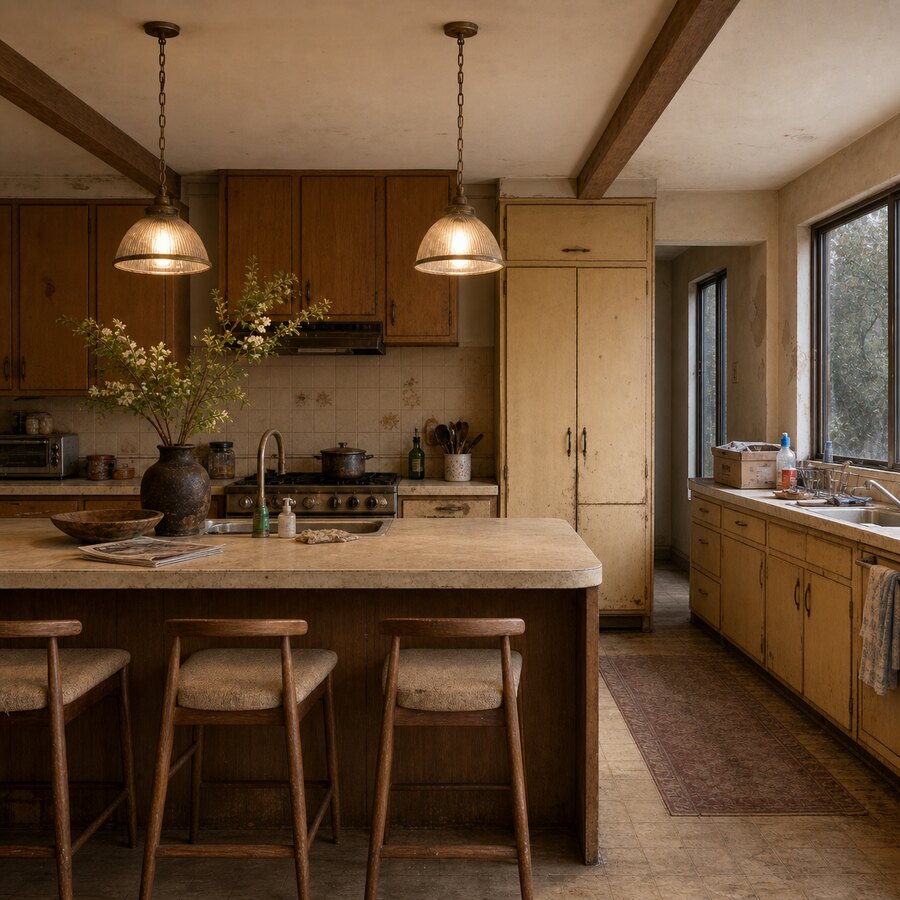
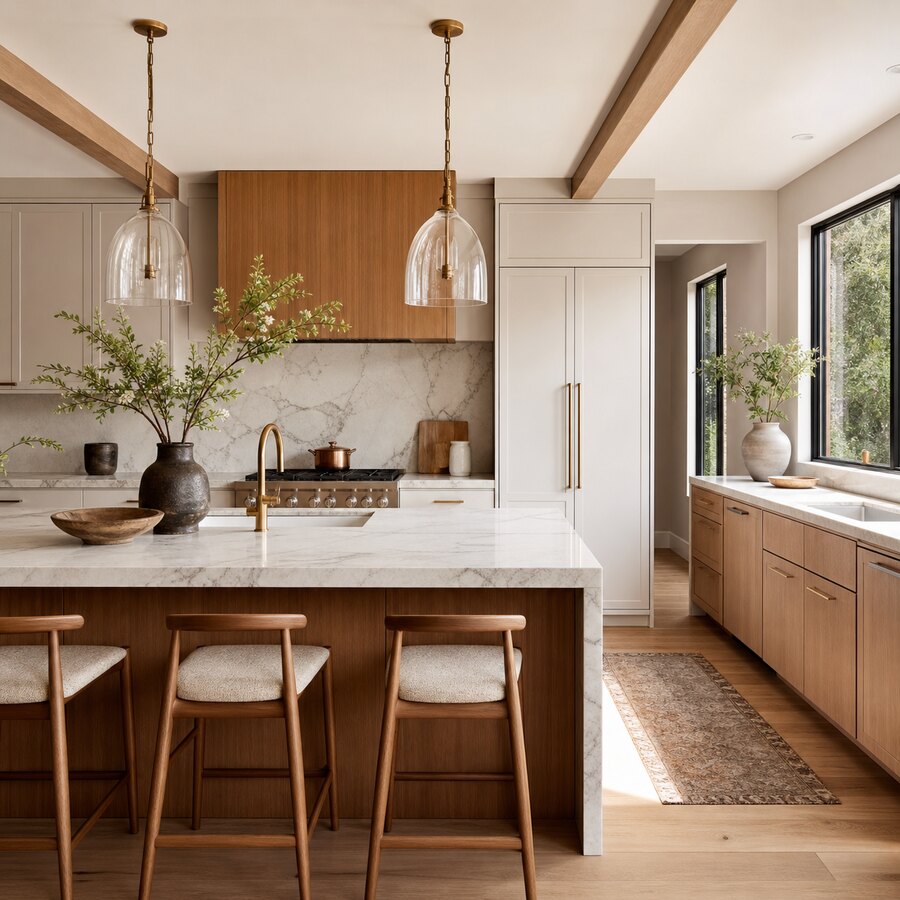
What to compare in an online kitchen makeover tool
If you are using a virtual kitchen makeover UK search to compare tools, look beyond novelty. A useful tool should help you make decisions, not just produce a dramatic image. The best results usually come from testing one or two variables at a time.
Cabinet colour and finish
Start with cabinet colour because it controls the whole room. Try a light neutral, a warm natural shade, a darker statement colour and one softer trend-led option. In many UK kitchens, a mid-tone cabinet can be more forgiving than bright white, especially if the room has limited natural light.
Wall colour and lighting temperature
Paint and lighting are often cheaper to change than units, but they can completely shift the feel of a kitchen. Use virtual previews to compare warm white, soft stone, pale green or muted pink walls. If your room faces north, be careful with cold greys and bright whites, which can feel flat.
Worktops, flooring and texture
Many kitchens fail visually because every surface competes. If you choose veined worktops, keep flooring calmer. If you want patterned flooring, use simpler cabinets and worktops. A makeover preview makes it easier to spot when the combination is too busy.
Storage and visible clutter
Good kitchen design is not only about colour. Look at whether the preview suggests better storage, fewer open shelves, a cleaner appliance zone or a more practical dining corner. If the image looks beautiful only because every kettle, bin and toaster has vanished, treat that as inspiration rather than a realistic plan.
How to get better results from a kitchen photo
The quality of the input image matters. Take a landscape photo in daylight, with the lights on if needed, and stand far enough back to show the main run of cabinets, floor and ceiling. Wipe surfaces first, but do not hide the real constraints of the room. The point is to improve the kitchen you actually have.
Avoid extreme wide-angle photos if possible because they can distort proportions. If your kitchen is narrow, take two or three views: one from the doorway, one from the opposite end and one showing the dining or utility area. You can then compare whether the same colour idea works across the whole room.
For a quick visual starting point, you can try the AI studio with your own kitchen photo. Use the result as a mood and direction guide, then check measurements, products and installation details before buying.
Virtual makeover vs online kitchen planner
These tools sound similar, but they do different jobs. A virtual makeover is usually image-led. It helps you see style, colour and atmosphere. An online kitchen planner is usually measurement-led. It helps with units, dimensions and sometimes quotes.
If you are early in the process, start with a makeover because it is faster and more flexible. Once you know the look you want, move to a kitchen planner or showroom appointment to work through unit sizes, appliance clearances, corner storage, extraction, sockets and costs.
For a small kitchen, this order is particularly helpful. You can first explore whether a lighter palette, slimmer handles or removing wall units would make the room feel bigger, then move into practical planning. Our guide on renovating a small kitchen on a budget in the UK is a useful next read if you are trying to control costs.
What a virtual makeover cannot tell you
It is worth being honest about limitations. A generated image cannot confirm structural changes, exact product availability, installer labour, electrical certification, gas safety, ventilation rules or whether a wall is load-bearing. It may also make awkward spaces look easier than they are.
Use online ideas to narrow choices, not to bypass professional advice. If the change affects plumbing, electrics, gas, walls, ventilation or building control, speak to qualified trades. If the kitchen is part of a rental, leasehold flat or listed property, check permission before planning major work.
How to turn online ideas into a real kitchen brief
Once you have a few promising visuals, organise them into a short brief. This makes quotes more accurate and reduces the chance of being pushed towards whatever a showroom wants to sell.
- Choose one preferred direction and one backup direction.
- Note the cabinet colour, worktop style, splashback idea and flooring tone.
- Mark what must stay, such as appliances, plumbing points or existing units.
- Set a realistic budget range in pounds, including labour and contingency.
- List practical problems to solve, such as poor storage, weak lighting or lack of prep space.
You can also compare your result with other realistic room transformations in our before and after gallery, or read how AI compares with professional advice in AI vs Interior Designer: What Should UK Homeowners Use First?. If your project includes more than the kitchen, the examples in Small UK Home Glow-Ups can help you keep the whole home consistent.
Cost: does using a virtual kitchen makeover save money?
It can, but mainly by reducing poor decisions. The tool itself may be free or low-cost, while a full kitchen refresh can run from a few hundred pounds for paint and handles to many thousands for new units, worktops and installation. Seeing ideas first can stop you buying the wrong samples, choosing a finish that clashes, or requesting quotes for a direction you later abandon.
The biggest saving is often clarity. A homeowner who can say “we want warm off-white shaker-style doors, oak-effect worktops, brass handles and fewer wall units” will usually have a better conversation than someone who simply asks for “a modern kitchen”.
Best next step
If you are comparing online tools, use a virtual makeover first to find the look, then use a planner or professional appointment to confirm the build. Keep the process grounded in your real room, real budget and real constraints. A strong preview should make the next decision easier, not create a fantasy kitchen that cannot be built.
FAQ
What is the best way to use a virtual kitchen makeover in the UK?
Use it at the early decision stage. Upload a clear photo of your current kitchen, test several cabinet and colour options, then use the best results as a visual brief for quotes, samples and professional advice.
Can an online kitchen makeover replace a kitchen designer?
No. It can help you explore style and layout ideas quickly, but it cannot replace measured plans, product specifications, safety checks or an experienced designer’s judgement on space, services and installation.
Can I use a virtual makeover for a small UK kitchen?
Yes. It is especially useful for small kitchens because you can test lighter colours, reduced wall units, compact dining ideas and storage changes before committing to a costly redesign.
Will the colours in a virtual makeover be accurate?
They are a guide, not a guarantee. Screen brightness, lighting, camera quality and AI interpretation can all affect colour. Always check real paint, cabinet and worktop samples in your own kitchen before buying.
What photo should I upload for the best result?
Use a well-lit, landscape photo that shows the main cabinets, floor, ceiling and worktop area. Stand far enough back to capture the room shape and avoid heavy filters or extreme wide-angle distortion.